Copilot KubuntuDesktop Kit

v0.1.0 Experimental preview

Copilot CLI,
on your KDE desktop.

A deliberate route from the terminal to a desktop app. This kit connects Copilot CLI to computer-use-linux—with setup you review and permissions you approve.

Start with one window

No root. No global profile overwrite.
Not a new automation engine.

Unofficial. Not endorsed by GitHub or KDE.

The control path Starts on agent selection
Copilot CLI's desktop-operator agent talks to the pinned computer-use-linux backend over local stdio MCP. You approve the KDE portal; the backend then operates the requested app.
Local stdio describes the connection.
It does not mean offline model inference.

01 / Get started

A fixed release.
An explicit install.

You need a working Copilot CLI and KCalc. Run these steps from your logged-in KDE Wayland session.

Review the v0.1.0 source

Use this versioned local-loading path. Keep the checkout: it is also your way to remove the backend.

Clone and check the release

Review the source first. After cloning, compare HEAD with the full commit below before running any scripts.

Shell · source checkout
git clone --branch v0.1.0 --depth 1 \
  https://github.com/arjith/copilot-kubuntu-desktop-kit.git
cd copilot-kubuntu-desktop-kit
git rev-parse HEAD

Expected commit02d3a7f653c6038e92729b709c64cdb3a4135d49
Read the plan. Nothing downloads yet.

Shell · plan only
python3 scripts/desktop_backend.py install

The backend is pinned to upstream v0.7.53. Review the three binary sizes and SHA-256 hashes along with the destination.

Apply, then check readiness

Only continue if you accept the plan. install --apply downloads and verifies the three binaries in your per-user data directory.

Shell · explicit download
python3 scripts/desktop_backend.py install --apply
python3 scripts/desktop_backend.py doctor

Doctor is not permission. Resolve reported readiness problems before continuing; capture and control still need your approval.

Load locally. Select the desktop agent.

The skill list should show six skills. The next command opens Copilot with this checkout loaded.

Shell · local plugin
copilot --plugin-dir "$PWD" skill list
copilot --plugin-dir "$PWD"
Inside Copilot · agent selection
/agent copilot-kubuntu-desktop-kit:desktop-operator
Prefer a persistent install?

The local-loading path above is useful for reviewing the source first. A maintainer-run catalog also installs the same pinned v0.1.0 plugin without the deprecated direct-install route:

copilot plugin marketplace add arjith/copilot-kubuntu-desktop-kit
copilot plugin install copilot-kubuntu-desktop-kit@kubuntu-desktop-kit

Restart Copilot after installing. This installs the skills and agents, not the backend; the explicit backend setup and portal approval steps still apply.

This is the project's own catalog, not a GitHub/KDE endorsement. Awesome Copilot review is still pending.

02 / Manual acceptance task

One window.
One visible result.

Open KCalc yourself. With desktop-operator selected, give it this bounded task. Approve any capture or control portal yourself.

A verified run is shown
in the evidence section.

Give Copilot this prompt

In the KCalc window, calculate 19 multiplied by 23 using the visible calculator controls. Read the result back. Do not use a shell, other applications, or change the calculator's settings. Stop if the target is ambiguous.

Expected in KCalc

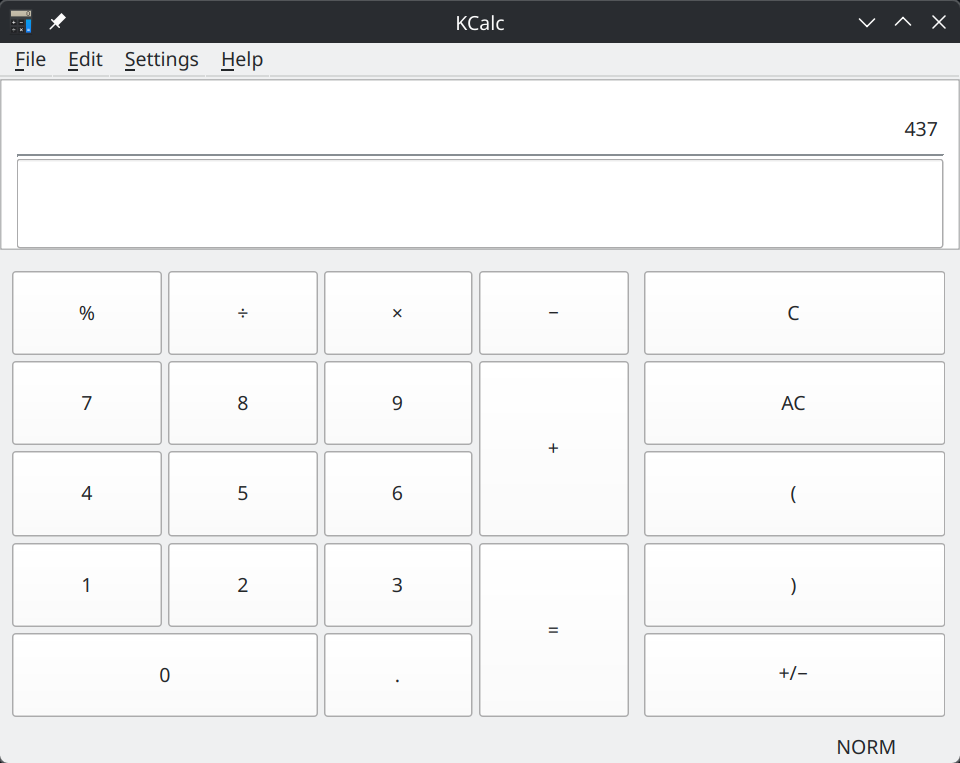
437

Verify it in the app yourself.
A correct answer in chat
does not pass this task.

Permission denied? Stop. Stop for an unrelated target or uncertain focus, too.

More small tasks

03 / Operating boundaries

Local control.
Not local inference.

Consent is a real step in the workflow, not something for the agent to click through.

Know what can leave the desktop

Screenshots and app text can enter model context. A local stdio connection does not make model inference offline or private. Screenshots are not automatically password-redacted.

Starts on selection
Selecting the desktop agent launches its local stdio MCP, kubuntu-desktop. Plugin loading alone does not download binaries or start a desktop server. An existing global backend is not replaced.
You authorize
Portal approvals, passwords and MFA remain direct user actions. A permission denial means stop—not retry with broader access.
Restricted routes
The optional shell tool and direct input-device route are disabled. No root access or global Copilot profile overwrite is required.
Scoped, not isolated
Physical input and other controllers can invalidate focus. Do not run competing controllers. Agent instructions are not an authorization system or a security sandbox.

04 / Inside the kit

Four agents.
Six portable skills.

Guidance, an installer, a doctor and rollback.
Desktop control comes from the upstream project.

The four Copilot agents and their roles
AgentUse it for
desktop-operatorExplicitly requested GUI tasks
workstation-doctorFocused Kubuntu diagnostics
python-engineerProject-local Python and uv
cuda-engineerCorrect, bounded GPU work

Portable guidance, separate from the host

  • Kubuntu workstation
  • KDE integration
  • Python / uv
  • NVIDIA / CUDA
  • Copilot diagnostics
  • Linux computer use

Engineering agents do not need the desktop backend. Compatible hosts can reuse the portable skills; agents and rules live in com.github.copilot/.

05 / Evidence, not promises

What has
actually passed.

This is an experimental preview, not a claim of reliable unattended desktop control.

Read the acceptance scope
The actual KCalc test window showing 437 after the packaged desktop agent calculated 19 times 23 through accessibility buttons.
The packaged desktop agent completed this task through semantic AT-SPI controls in KCalc 26.08.1. User-approved, calculator-only capture. This does not verify portal-pointer or keyboard input.

Synthetic tests & installation gates

20 synthetic tests and the canonical plugin, skill and marketplace installation gates passed. These checks cover packaging and safety behavior—not broad GUI reliability or marketplace listing.

A controlled test window

User-approved capture, focus, keypress and accessibility readback passed on the initial KDE Wayland host. That is separate from the KCalc task above.

Coverage is still narrow

Broad hardware, display and keyboard-layout coverage is not established. Multi-monitor, fractional-scaling and interruption behavior need explicit testing. Other host configurations are not claimed supported.

A useful report is small and specific.

Include the release, Copilot and KDE/Wayland versions, task, first failing stage, and pass/fail for the visible result and rollback. Add scale or keyboard layout only if relevant.

No tokens, private code, desktop screenshots, complete configurations or raw logs. A permission denial is a valid outcome.

Report compatibility

06 / Roll back

The exit path,
in plain sight.

From your retained checkout, plan removal before applying it. Remove the backend before unloading the plugin.

Shell · removal plan
python3 scripts/desktop_backend.py uninstall

If you accept that plan:

Shell · explicit removal
python3 scripts/desktop_backend.py uninstall --apply

Restart Copilot without --plugin-dir. Removal refuses modified binaries, symlinks and unknown files. It does not delete personal Copilot settings or another backend installation.

If you previously installed persistently

After backend removal, run copilot plugin uninstall copilot-kubuntu-desktop-kit@kubuntu-desktop-kit for the maintainer catalog install, or copilot plugin uninstall copilot-kubuntu-desktop-kit for an older direct install, then restart Copilot. Remove the optional catalog with copilot plugin marketplace remove kubuntu-desktop-kit. None of these commands are needed for the local-loading path above.